The Power of Fluff: Enhancing Team Collaboration

I’m sure somebody who is an expert in human psychology could shed more light than I, but there’s something about fluffy objects that brings us joy and comfort. Cute dogs and cats, baby ducks, snugly blankets. We just can’t resist the fluff, its part of who we are. Except for the fluff on peaches… that’s gross. Nectarines are just better.

Yet fluff is also a visible sign of superfluity – fluff is a disorganised, chaotic, mass of extra material that seemly isn’t essential to the function of the object to which it attaches. So its easy to think of fluff as something we need to cut through for efficiency’s sake. Indeed, it was with this lens a couple of years ago, that I found myself booking a long overdue planning meeting for my new team. Knowing that as a remote team there would be some delay in getting everyone into the Teams call and settled down, I flippantly added this time to the agenda for the first five minutes as “obligatory fluff”.

To my surprise, not only was this block of time where the team were given permission to chat crap about any topic they wanted very successful, but the phrase stuck. It quickly became a trademark of my team and entered into our way of working.

We even had memes we’d share in meetings when we had run too far off topic and the meeting had become “too fluffy”. We loved the idea of fluff so much that it became a part of everything we did – fluff at the beginning of calls to get settled. Fluff at the end as a reward for finishing early. Fluff in the middle of the meetings when we got distracted and started talking about random things.

Maybe it seems here that we were losing sight of what we should have been doing, but it was the opposite. By having permission and time to be fluffy, it was easier to call the event to order and focus on the important core of the meeting. Its about balance.

Fluff – far from being an extraneous thing to be cut back, simplified, made more efficient – became the warm, cosy embrace that tied us all together as humans, collaborating on a shared project, rather than drones clicking though one Jira ticket after the next.

The team bonded really quickly after that. They saw each other as humans with more depth than just being a “backend engineer” or “that guy who fixed the bug nobody else could figure out”. They started to care about each other, and as a result worked stronger as a team. They would help each other because they wanted to, not because that’s what it said they should do in the career matrix for the promotion they were hoping for.

Look, I’m not saying you need (or necessarily should) be friends with your colleagues – boundaries are an important part of maintaining a strong work / life balance, and leaving your colleagues at work can be part of that. I’m certainly not suggesting you describe yourself as “one happy family”, but there’s no reason you can’t have work friends. In fact I (personally) think you really should.

Would you invite them to your birthday? Probably not. Should you huddle in the kitchen together and vent about management? Hell yeah! Should you tell them about your relationship issues? Definitely not! But sharing your passion for hobbies with them, why not? We’re not just cogs in a corporate machine – we’re complex, messy, multi-dimensional humans, with squishy, complex human lives. And its okay to be yourself. Just remember to keep your fluff safe for work, “off topic” does not give you permission to make people uncomfortable. Know your audience, folks.

From my first flippant mention of “fluff”, I never intended it to become one of the core tenets of my management style. But I’ve seen its power, and when I moved on to a new company and a new team, I decided to take it with me. To make fluff a word, and a way of thinking for that team too.

So, maybe next time you’re having a dead serious meeting, about important things. Take a look around you, look at each member of your team in the eyes, and ask yourself – is this person a cog in my machine, or are they a human? Could they benefit from and contribute to fluff? I bet they could.

Give it a try. Bring some fluff to your meetings and see what happens.

Exciting News: My Insider’s Guide to Landing a Tech Job Is Now Live!

It had been a dream of mine for quite some time to work in software engineering. When I reconnect with distant family members and they ask what I’m doing now, they often aren’t surprised. Many tell me they always knew that’s where I would end up. And I agree with them—my choice of career has remained remarkably steady from my early school years all the way to university, with only one or two momentary diversions from that dream.

My family always embraced modern technology, but they weren’t particularly knowledgeable about how to actually get started in the field. These days, getting into programming, hardware, IoT, or even AI is much simpler. There are countless resources available to help you build the skills you need.

However, one hurdle often remains: how to turn those skills into the job you’re looking for.

During my career, I’ve worked as a hiring manager and interviewer at both large and small companies. I’ve helped sort through resumes during the initial application process, written interview questions, and even trained new interviewers. I’ve mentored and coached engineers from the very start of their careers all the way up to principal level, and I’ve worked directly with leaders to understand what they need from a productive team.

That’s why I’ve decided it’s time to start sharing what I’ve learned to help others—giving them the advice I wish I had.

I’m kicking this off by launching my new video course:

“From Application to Offer: The Insider’s Guide to Getting a Job in Tech”

This course distills everything I’ve learned—helping candidates, whether new or experienced, gain an edge when applying for software engineering and other tech roles.

🔹 Craft a tailored resume
🔹 Master key interview skills
🔹 Tackle design challenges with confidence
🔹 Ask the right questions in interviews

It’s been a real journey learning the skills needed for video production, from lighting and sound to editing. So I’m incredibly excited that the course is now available!

I would love for you to check it out and share any feedback.

It’s available now on Skillshare and Udemy! If you don’t have a Skillshare account yet, you can get one month of free access using my link.If you’re using Udemy, use code “ANDYCB-FEB24” for 25% off for a limited time.

I hope you find it useful!

Redefining Technical Debt: A Guide to Prioritizing Tasks with Customer Value in Mind

Anybody who’s worked in software engineering – be that as an engineer, program manager, designer, or any one of the numerous other roles essential to the delivery of quality software – will be well aware of the term “technical debt”.

Photo by Jason Goodman on Unsplash

At its most simple level, Technical debt is a technical task that was omitted earlier in the project (often to meet a tight deadline) that requires repaying (ie. It still needs to be done). The challenge comes from its nature as a “technical” task – that is, it is most easily attributed to bringing value to the code, or technical team, than it is to the customer.

This tension can often make tech debt tasks hard to prioritise – if you’ve been involved in planning or the management of software engineers how many ties have you heard a complaint to the effect of “I can never get the technical debt prioritised, the business only cares about new features”?

I’ve worked on different teams, on different projects, and at different companies, during which I’ve formed a few opinions on how tech debit is best managed and prioritised, which I think can help teams be most productive.

Before you read any further, I should make clear, that I don’t believe that the “most productive” teams, (that work harmoniously and resolve this tension) manage this by just fixing all of the tech debt. Nor do I think everybody is necessary happy with the outcomes. They key thing is that all parties involved have made a conscious and deliberate decision that they should or should not work on a particular task at a particular time.

There have been several methods used in teams to try and manage this balance – one such technique is reserved time – ring fencing x% of a team’s capacity for tech debt tasks. There are places and times where this works great, but I don’t think it a solution that considers all of the angles.

Continue reading

Git For Humans: A Easy To Understand Video for Working With Git

A few years ago, I was working on a team who had been working with TFS project for some time. They had just started a new project and decided to move to Git in the process. Git was new to all of the engineers on the team, myself included, but we continued anyway.

At first, everything seemed to work fine – Visual Studio’s built in Git UI did a good job of hiding Git’s power, and presenting it in the same way as TFS. However, we increasingly ran into problems; people lost work, or waisted time working though merge issues. Visual Studio was doing a fantastic job of hiding Git, and while this seems like a well-meaning and helpful thing to do, it was causing us issues in the long run, because we were didn’t know what we were really doing behind the simple UI.

I decided to go away and deep dive into Git. I found that by understanding the Git graph, it allowed me to demystify the Git’s command line and visualise & plan their impact on my repository.

I started sharing what I had learned with my team, and was frequently asked to run training sessions or solve problems. I really did find that by understanding how Git works, and visualize the operations, I was able to work much faster and with much greater confidence.

I’d love for everybody to see and understand Git in this way; it really is a wonderful tool once you’ve unlocked it. So, I decided to put together a video to share how I see Git.

You can watch it above. This was a fascinating learning experience for me; setting up the recording and learning how to efficiently edit large projects (shout out to my video editor friend who’s brains I picked several times!). Constructive feedback is, of corse, gratefully received.

As ever, you can get in contact by commenting or on Twitter / Mastodon

How To Make a Long Term Career Plan That Actually Helps

A career plan: we should all have one, right? But it can be hard to know where to start, or what you should do with it once you’ve made it. This can be especially challenging when you’re just starting off in your career – you manager asks what you want from your job, and don’t really know what you want beyond ‘just progression’.

A child stand in the countryside, holding up a map.
Photo By Annie Spratt

Today, I want to tell you a little about how I manage long term career planning for myself, and how I use that to make regular evaluations of those plans and my progress towards them.

A Plan Is a Guide to The Next Step, Not a Rigid Set of Rules

It’s easy to think of a career plan as something rigid and unchanging; a plan that you must stew over and perfect every detail, and then stick to forever. This can make a career plan a very intimidating document. How do you think it all through? How do you know if you’re on track or not? What if you’ve made the wrong plan and won’t be happy!?

Instead, think of a career plan as a framework to help you process your feelings and observations in order to plan out next steps. You can then regularly use this framework to evaluate your current path and chosen destination.

Imagine, you’ve been dropped in the wilderness without knowing where you are or how to get back. Perhaps you climb to the top of a large tree nearby and look out around you. As you look to the north, you can see smoke rising in the distance, maybe it’s a camp? You decide to head towards it and find out.

A person standing in the clearing of a forrest.
Photo by Robert Bye

After walking for a couple of hours, your progress is halted by a wide, rushing river, and there’s no way you can cross it. There’s no way to continue to the north now. It’s time to revaluate your plan, heading north was a great idea in absence of more information, but now you know about the river, is heading that way, still the best path? Perhaps you can see something else from here? Perhaps north is still the best direction, but you need head a different way for a little to find a place to safely cross and head back.

That’s the thing with plans: You need them, they give you direction of purpose, but the most successful people are always considering their plans – changing and tweaking them to ensure they’re making the best choices for the current data they have. Changing a plan is not a failure, it doesn’t mean your plan wasn’t good enough. Changing plan means you are in control and evaluating input data.

Where Do You Start?

Just like with the above example, you start not with the next step right in front of you, but with the destination, and figure out next steps from there.

Continue reading

Finding Your Happy Place: Demystifying the Challenges in Frontend and Backend Development and How You Fit In

Software engineering is a very broad profession with many different types of work you can do, each with their own opportunities and challenges, but have you ever wondered what those opportunities are? Perhaps you’ve feel your work isn’t challenging you enough, or you’re not motivated by what you do.

A picture of a woman working writing code.

Photo by ThisisEngineering RAEng on Unsplash

In this article, I want to take you though some of the different places software engineering can take you, and what the opportunities, challenges and rewards are for each of them. Hopefully by the end you will be more equipped to understand the challenges and opportunities available to you and how you can shape your career choices around what excites you.

Front End & Back End?

You’re probably familiar with the split into “frontend” and “backend” engineering, you’ve possibly seen somebody exclusivity describe themselves as a frontend / backend engineer.

Separations like this are a good start, and we tend to think we have a pretty good handle on what they mean, but I don’t think they tell the whole storey. This separation makes the assumption that each of these categories is a fundamentally different role. However, the core challenge and activities in all of these roles is the same; you’re using your creative human brain to find solutions to problems and convert those solutions into code.

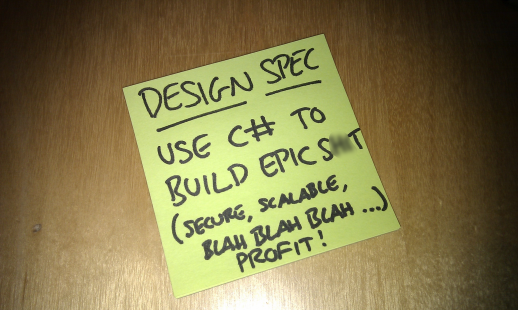
Or as a former manager of mine put it…

A post-it note reading "Design spec = Use C# to build epic s**t (secure, scalable, blah, blah...profit!)"

The biggest difference between front and back end development sits in two areas: The tools used to do your job and the problems you will be solving. Let’s dig into each of those a little deeper to see how they can effect the work you do.

Tools

No matter what you do, you probably use some kind tools, and those tools will be highly specialised to the task you are doing. For a mechanic these tools may looks like wrenches, screwdrivers or diagnostic devices. But for a software engineer these are more like the programming language, operating system, development frameworks and even development methodologies.

But here’s the thing: You are not your tools.

These tools exist to help you get your job done and may be different depending on what that job is. You shouldn’t allow yourself to become limited or defined by the tools you use. You chose them, you learned how to use them, but they are but an artefact of the problem you are solving not the definition of what you do.

The Problems Being Solved

The other difference is the actual problems you are trying to solve – the challenges you are facing on a daily basis. I’ve heard a lot of engineers over the years talk about how they don’t feel like their project is providing them with “real challenges”.

A image of a man and a woman working together on a computer

Photo by heylagostechie on Unsplash

For developers who work on the front end, this can often sound something like “all I do is call and API and render it on the screen; I don’t do any ‘real engineering’”. Whereas on the other side it can sound like “All I do is manipulate data and pass it to the UI; I’m too far from the real code that the user sees”.

Often when feeling this way, there is challenge available to them – but it’s not challenge that excites them, it’s not work that motivates them to get out of bed in the morning and go to work.

If this sounds like you, perhaps you too are not solving challenges that motivate you. Understanding what challenges are available in different roles and knowing which ones inspire you most will empower you to make the right next move in your career (weather that be a new job, or a discussion with your manager to ask for different activities).

The Challenge Spectrum

So, it seems that a traditional frontend vs backend definition is not enough to articulate the different choices you can make to position yourself in a place to solve exciting problems and do your best work. Instead, I want to introduce you to the Challenge Spectrum.

The Challenge Spectrum spans from data & platform challenges to human & interaction challenges, taking in all possible roles you can occupy along the way, all of them as just important as the others. At several points along the spectrum, Ive annotated some example challenges you may face at that location.

Continue reading