I’ve been building up my smart home setup for the last couple of years, and it generates a lot of data – from the cat’s weight, to the humidity in each room, and like any Smart Project full of sensors, the question becomes what do we do with all that data? Graphs and dashboards? Push notifications? Disembodied vocal announcements using the Sonos?

In the early 2000’s a company called Violet, released the Nabaztag – an internet connected Rabbit, with extremely expressive ears and lights on its belly. It wasn’t something I could afford at the time, but ever since, I’ve been interested in the idea of ambient or glanceable devices – devices that fit into our environment and let us know important information without directly calling for our attention.
I decided to try to use a cuckoo clock as the foundation for an ambient device project. I had this plan that I could add a light to the bottom of the clock that would create a nice glow on the wall behind it. I also planned to take control of the cuckoo mechanism, so rather than chiming on the hour, it could chime whenever I wanted (if I wanted a somewhat less passive notification). While putting together an order of the components I would need, I came across a ring of 20 RGB LEDS that would fit nicely behind the clockface, so I added that to the plan too.
Now, I have far too much respect for mechanical clocks to go tearing into beautifully made mechanical clock, so I started on eBay with a battery powered, plastic quartz clock. I was actually pretty impressed by this clock in its default state, it was reasonably attractive (if you’re into modern minimalist cuckoo clock styles) and the cuckoo sound was decent. My only real complaint was that the hands were a really long way forward of the clock face, which didn’t look so great if you weren’t looking at the clock directly from the front.
The Teardown
I started pulling the clock apart to see what I would find, and it was pretty interesting. The chime & cuckoo are in their own module, connected to a clock & pendulum module. I was amused to find that when I further dismantled that clock module, it contained a standard clock unit inside it – complete with normally inaccessible AAA battery connecter. Because sometimes, even in mass production, its easier to repurpose an existing item then built it from scratch.

It seemed like a pretty achievable job to get what I wanted – cut the signal wires between the clock unit and the chime unit, and route them to a microcontroller. It was also possible to cut the power cables going to the pendulum magnet and route that to the microcontroller so I could have control of when it was swinging.
The Hardware
I’d been meaning to have a play with a Raspberry Pi Pico in a project for a while, so I used Pico W with the Micropython firmware. I hacked together a prototype and was able to control the chime on demand.
Some more hacking together and I had the LED ring working too.
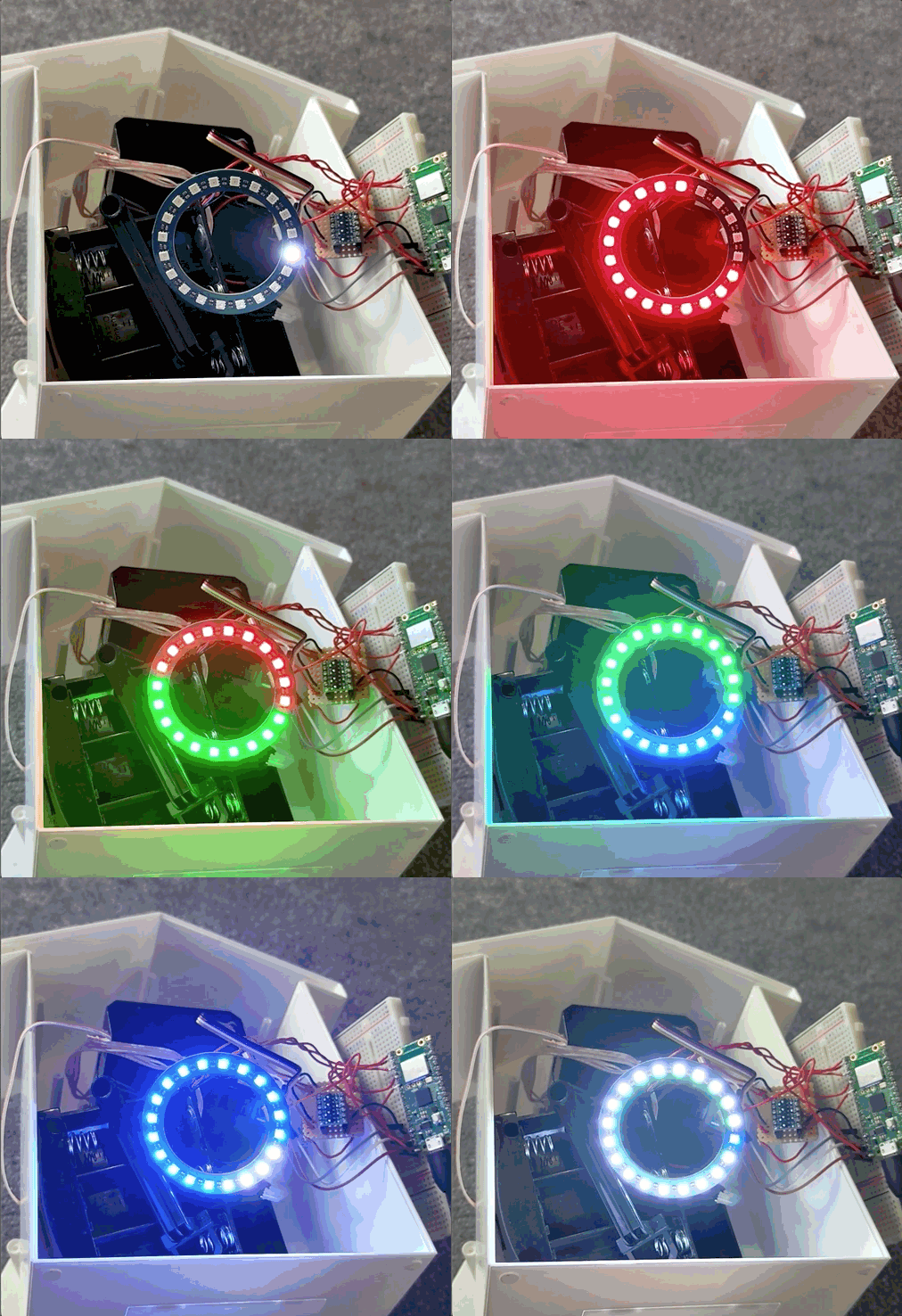
I used basic 5mm tri-colour LEDs for the pendulum light, I soldered two together in parallel so I could angle one at the pendulum and the other at the wall behind it. I connected them through three transistors to the Pi where I can control each one using PWM to vary their relative brightness so they would function as a single RGB light.
Finally I added a light dependent resister to one of the ADC pins of the Pi Pico, and hot glued it to the inside of the case. The plastic is so thin, that I was still able to detect changes in ambient light levels without having to drill a hole for the sensor to poke out of. I planned to use this later so the dial and pendulum lights could dim after dark.
With everything prototyped and working, I soldered it together into a more long term circuit board and tided it all away inside the case.

I glued the LED ring to the back of the clock face so the lights would shine through. I was carful to align it with the first LED at the 12 o’clock position.
As I had hoped, the extra thickness of the LED ring meant that the clock movement was pushed back into the clock, closing the gap between the hands of the clock and the face – greatly improving the look of the unit when viewed from a side.

Unfortunately, this meant that the clock module was now too thick to fit inside the body of the clock. As I no longer required two C cell batteries to power the chime (now powered by USB via the Pi), I decided to aggressively hack away the battery box using a Dremel.
My original plan here was to power the clock movement itself off USB too, but I ultimately decided it would be better if the clock could continue to keep time if the power went off, so reverted to powering it from a single AA battery. By the time I had made this change, the original battery box was already removed (hacked away), so I added a replacement in its place – the only spare one I had being for two batteries, so I roughly bridged the second battery. I’ll order up a single battery box at some point, but sometimes the best item for the job is just the one you have.
The software
With the hardware squared away inside the clock body, it was time to move on to the software. I had some features in mind:
- Use the dual ring as a progress bar to count down cooking timers
- Use the cuckoo to chime at the end of a cooking timer
- Use the pendulum light to alert me when the cat litter needed cleaning
- Tell the time
I originally considered implementing these features directly in the device firmware – so there would be a REST API for setting a timer, showing litter alerts etc, and then the light patterns and timing would be managed entirely on device. However I decided it would be more flexible if I tied the clock into the existing smart home – exposing the each hardware function directly to Home Assistant, and implementing the functions using automations.
For this I made use of MQTT auto discovery, which allows the clock to publish information to an MQTT topic describing each of the its features. In the end. The clock presents the following entities to Home Assistant though MQTT:
Dial light
An RGB light, for the current colour of all 20 LEDS around the face. Presents a list of “effects” to allow Home Assistant to choose different patterns to play on the dial.
Pendulum Light
An RGB light for the light that shines on the pendulum, an effect allows the light to either be a solid colour or to “breathe” up and down (I really like this).
Pendulum Swing
A switch that enables or disables the pendulum from swinging as the clock ticks.
Count down seconds
A number entity, that when set to a number of seconds, will cause the clock to count down the time on the dial lights.
Chime
A switch that activates the cuckoo to sing. The clock will chime once and then automatically return this switch to off
Light level
The current ambient light level detected by the clock, as a number 0-1, where 0 is full brightness and 1 is full darkness. Due to a bug, sometimes reads up to 1200. This may or may not represent the end of days.
Source Code
I wrote the clock software using Micro Python, the source code is available on GitHub.
Using Home Assistant Assist
As I mentioned before, I wated to offload much of the logic from the clock and into Home Assistant – Essentially demoting the device from Smart Clock, to “bunch of network connected lights in a box”.
I created an automation in Home Assistant, that made use of the Assist Custom Sentences – So that when I asked Assist to set a timer, the automation would start a countdown on the clock dial lights, and set a delay of its own. When the timer completed, the automation would play a pattern on the dial ring and chime the Cuckoo to get my attention. A copy of the automation YAML is here.
I also tied the clock into some of the existing items on the smart home – specifically the cat litter project. Whenever my cat, Ellie, users her litter tray, it takes a measurement of her current weight and sends a notification to my phone that the tray needs a clean. I modified this automation, to illuminate the pendulum light in red for 30 minutes after the “gift”, as a passive reminder that I need to go and clean it.
Demo
Here’s a video of the clock running:
Lessons Learned
As always, I enter into these projects, not because I know everything and want to produce a perfect product, but because I want to learn about things and hopefully produce something entertaining in the end. And this project has no shortage of mistakes lessons:
Getting White Light out of a tri-colour LED
I happened to have some tri-colour LEDs in stock (from a plan to build a Home Assistant Glow device), so including them for the pendulum light seemed like a good choice. Of course while a tri-colour LED, is a red, blue and green LED assembled into he same package, it is not an RGB LED.
That is, the light output of each colour LED is very different – in the same way that if you put a red LED and a green LED next to each other, the red one will be much brighter, so is the red output of a tri-colour LED.
Of course, a good approach here, would have been to resolve this in hardware – add appropriate valued resisters to each channel to get the same output from each. For simplicity (and because, when only showing red light, why not make use of the extra brightness?) I resolved this issue purely in software. When a RGB value is requested of the pendulum light, the firmware will offset the brightness of the red LED to achieve a consistent output.
Magic Smoke (Part 1)
In the original clock, the chime unit is powered by two C batteries, meaning it runs at 3V. I wanted the clock to run off USB for everything except timekeeping, so decided to power the chime from the Pi. At first, I tried running it from the 3v3 output, however all the motors and electromagnets used to move the bird in / out and up / down required more current than the Pi’s regulator could supply. I instead connected it to the bus voltage from the USB connection, it seemed to work fine and I was hopeful it had its own regulators internally to handle the extra voltage.
It did not.
After around 50 or 60 chimes while testing, the cuckoo’s voice failed – It would still move in and out, and rock backwards and forwards as it sung, but instead of sound, I got an acrid burning smell.
Magic Smoke (Part 2)
Having already broken the cuckoo’s voice, I decided to continue on developing the software and address how to fix the issue later. At which point, the rest of the cuckoo failed – he still moves out, but no longer moves back in automatically, nor does it rock as it sings. Clearly I’ve now broken the electromagnets and one of the motors.
My plan is to get a second “donor” clock, and replace the chime unit, using a high current 3V regulator and a logic level shifter to ensure the chime is more appropriately powered this time.
What Next
So what next for this project? Well obviously I need to fix the things I broke – it saddens me that the cuckoo no longer pops out of the clock and sings. I don’t particularly want to pull apart the parts of the clock that I already built and start again. My plan is to use some correctly rated voltage regulators and a logic level shifter to build a daughter board that connects to the current setup and the replacement chime. I have the parts, so I’ll update this post once I’ve got around to fixing this.
Of course, there’s another option when fixing the chime that I’d quite like to have a go at too. Rather than using an electronic cuckoo noise with a speaker, I would love to get an authentic cuckoo bellows and pipe, and connect them up to a servo, for a more natural sound.
Finally, the last thing I’d like to add to the clock is to add support for multiple timers – at the moment the clock can countdown a single timer on the clock face, but often when cooking you need multiple timers. I’d like to find a way of showing at least two timers on the face at the same time.
Conclusions
I had a lot of fun working on this project. I really enjoyed working with the Raspberry Pi Pico and I’ll use it again in other projects. If you have any thoughts, I’d love to hear then in the comments.
 Andy Bradford
Loved your cuckoo clock project!
LikeLike